Quick answer
To check whether a Solana wallet is active, verify its newest successful signatures and identify which events changed SOL, token inventory, or protocol positions. Record event time, observation time, direction, and cadence. Recent fees, transfers, or failed swaps prove activity, but not a new trade.
What an active Solana wallet means
An active wallet has recent verified on-chain events inside a period that matters to your research. The definition depends on the strategy. Ten minutes can be stale for a launch trader, while seven days may be current for a long-horizon accumulator.
Activity is not the same as trading. A wallet can appear in a transaction as a fee payer, signer, recipient, token-account owner, or protocol authority.
Use four separate labels:
- On-chain active: at least one recent verified signature involves the address.
- Economically active: a successful event changed controlled assets or a protocol position.
- Strategy active: the event matches the wallet behavior you are studying.
- Decision-fresh: the event remains recent enough to influence a current research decision.
A wallet can satisfy the first label without satisfying the other three.
Before you start: define the activity window
Choose the window before looking at the wallet. This prevents an old transaction from becoming “recent” only because it supports your thesis.
Record:
- the complete wallet address
- window start and end, with timezone
- observation time
- newest verified signature and block time
- transaction status and finality
- economic classification
- raw balance changes
- source freshness and coverage limits
Use the broader Solana wallet tracking workflow when activity is one part of a review that also covers funding, holdings, PnL, and related addresses.
Step 1: find the newest signatures
Open the complete address in a compatible Solana explorer or transaction interface. Read the newest signatures after the page has finished loading.
Save the signature, slot, block time, status, fee payer, and signers. For versioned transactions, resolve address lookup tables before deciding which accounts and programs participated.
Do not assume that the first displayed row is the newest complete event. Cached pages, client hydration, pagination, provider lag, and failed transaction-body requests can produce different visible states.
Check the source clock and the event clock
A current page load does not prove current data. Keep these times separate:
| Clock | What it tells you | Common mistake |
|---|---|---|
| Page observation | When you opened the interface | Calling the data current because the page loaded |
| Source update | When the provider refreshed its dataset | Ignoring a retained last-good response |
| Block time | When the transaction landed | Using a relative label without the exact time |
| Verification | When you independently checked the signature | Assuming an earlier status is still final |
Use the oldest decision-critical input as the freshness of your conclusion.
Step 2: separate economic activity from account noise
Open each recent material signature and compare pre-transaction and post-transaction balances. Classify the event only after the balance changes reconcile.
Economic activity can include:
- a completed swap
- an inbound or outbound transfer
- an LP deposit or withdrawal
- staking, lending, vault, or escrow movement
- a token distribution or claim
Administrative activity can include:
- account creation or closure
- rent movement
- fee or priority-fee payment
- approval or delegate change
- a failed transaction with no intended position change
Administrative events still prove that the address or its authority path was used. They do not prove a buy, sale, or renewed investment thesis.
Step 3: measure cadence, not only last-seen time
One timestamp cannot describe operating behavior. Review a fixed sequence and measure:
- successful economic events per hour, day, or week
- median and longest gap between events
- active sessions rather than raw transaction count
- buys, sells, transfers, and protocol actions separately
- token and venue concentration
- failed attempts and fees
Group transactions that belong to one routed trade or one position-management sequence. Ten signatures can represent one decision, while one signature can contain several inner movements.
Use active sessions to avoid inflated counts
Define a session as a cluster of related transactions separated by a fixed inactivity gap. Pick the gap before reviewing the wallet and adapt it to the strategy.
A launch bot may execute several signatures within seconds. A discretionary accumulator may place one order every few hours. Raw counts would make the bot look more intentional even if all its signatures belong to one failed or routed attempt.
| Pattern | Defensible reading |
|---|---|
| Many signatures, one token, seconds apart | One execution session until proven otherwise |
| Buys across separate hours or days | Repeated activity, subject to balance verification |
| Transfers among related addresses | Actor may be active while address exposure moves |
| Repeated failed swaps | Attempted activity, not executed exposure |
| One old buy and recent rent return | Address active administratively, strategy activity unproven |
Step 4: verify direction and current exposure
Recent activity becomes more useful when you know what happened to exposure.
For each material event, record:
- asset spent and asset received
- raw and normalized amounts
- transfer destination or protocol account
- remaining controlled quantity
- related-wallet inventory when supported
- fresh executable quote for the reviewed position size
A recent buy does not prove the wallet still holds the token. A recent transfer out does not prove a sale. A recent LP deposit can reduce the spot balance while retaining protocol exposure.
Use the Solana wallet holdings workflow to group token accounts by mint and distinguish marked value from executable value. Use the transaction-history guide to preserve signatures, failures, inner instructions, and coverage boundaries.
Step 5: compare activity with the wallet's established style
A wallet can be active but no longer useful for the strategy that made it interesting.
Compare the newest sequence with a fixed historical sample:
- token age at entry
- market-cap and liquidity range
- typical position size
- holding period
- launch, momentum, accumulation, or distribution style
- observed exit discipline
A wallet known for early launches may later become active only through transfers or large-cap rotations. The address is not dormant, but its old edge has not necessarily returned.
Use an activity-state ladder
Assign one state at the review checkpoint:
- Dormant under the chosen window: no verified signature inside the period.
- Administratively active: recent fees, account changes, or failed attempts, with no verified economic change.
- Economically active: a recent successful event changed assets or protocol exposure.
- Strategy-consistent: the recent sequence fits the wallet's previously demonstrated behavior.
- Decision-fresh: the evidence and current liquidity remain usable at your observation time.
The ladder prevents a binary active/inactive flag from carrying more meaning than the evidence supports.
Example: reading a representative activity sequence
Consider an anonymized wallet reviewed at 10:00 UTC:
- 09:41: token-account creation and rent payment
- 09:43: failed swap that paid a priority fee
- 09:46: successful 8 SOL swap into token A
- 09:49: half the acquired tokens transferred to another address
- 09:57: no new trade, but the related address sold part of its balance
- previous economic event: 12 days earlier
The wallet was administratively active at 09:41 and attempted a trade at 09:43. It became economically active at 09:46.
The transfer means address-level exposure fell, but it does not prove a sale. If the recipient relationship is supported, actor-level distribution began at 09:57. The long prior gap also means this is a reactivation, not evidence of steady activity.
The correct output is a timestamped activity classification with unresolved ownership, not “smart money is buying.”
Use Stalkchain to find active-wallet leads
Start with Smart Money Transactions to find recent qualifying wallet activity. The public view exposes transaction time, wallet, sold asset, bought asset, and USD value.
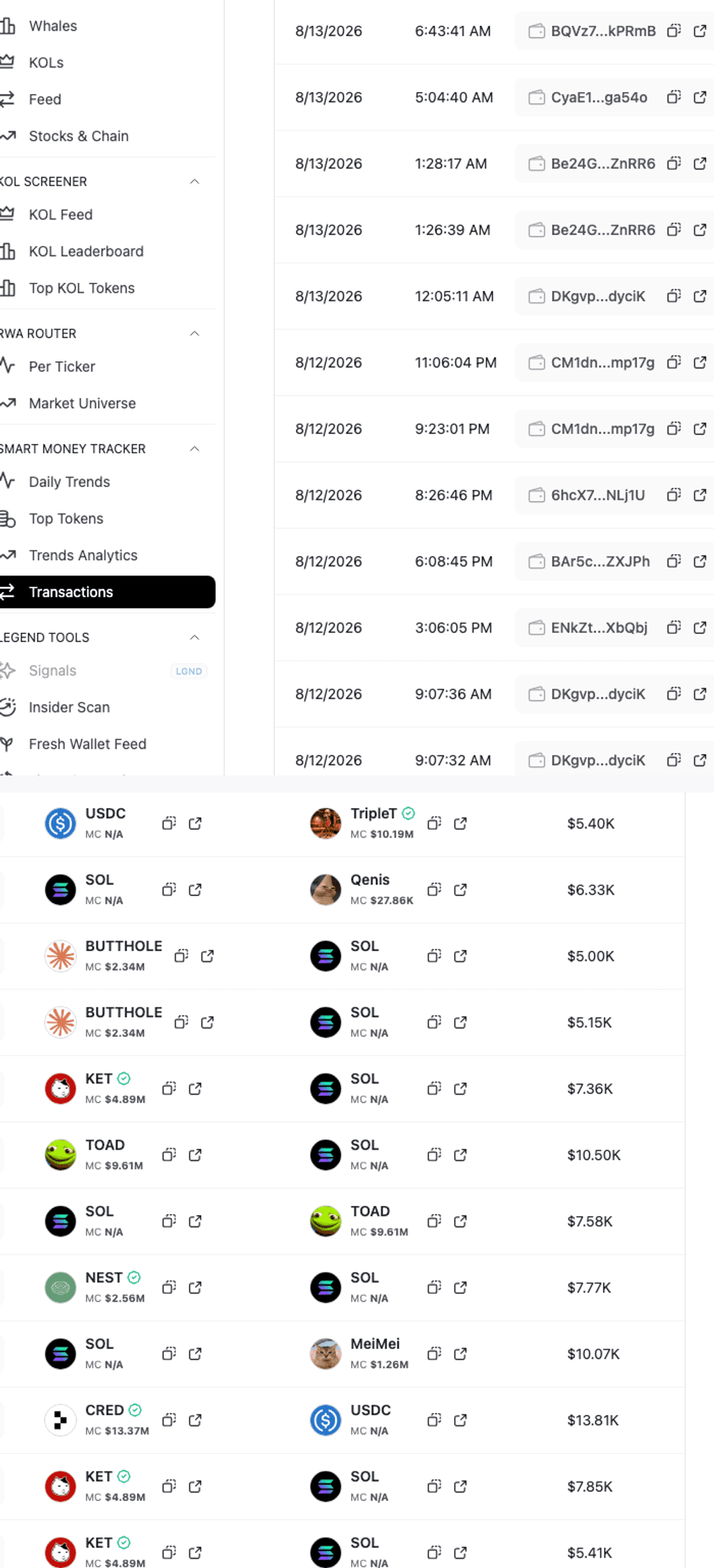
This production capture shows the fields needed to shortlist an active wallet and preserve direction. It does not prove the address's complete history, current balance, relationship to other wallets, or present profitability.
Use Fresh Wallets Feed when activation age and funding matter. Use KOL Feed when public attribution matters. Then open the complete address and signatures on-chain.
The guide to finding smart money wallets on Solana explains how to test repeatability, independence, accounting coverage, and follower execution after activity has been verified.
False positives to avoid
- Page loaded now: the underlying dataset may be stale or retained.
- Recent signature: it may be a fee, rent, account change, or failed attempt.
- Transfer out: inventory movement is not automatically a sale.
- Zero visible balance: assets may sit in another token account, protocol, or related wallet.
- Many rows: routed legs, retries, and duplicate pagination can inflate activity.
- Public label: attribution can be stale even when the transaction is real.
- Old reputation: historical profitability does not prove the current activity follows the same strategy.
- Recent buy: detection delay and thin liquidity can make the follower opportunity stale already.
Final checklist
- Define the activity window before opening the wallet.
- Save the full address, observation time, and timezone.
- Verify the newest complete signatures and block times.
- Record source update state separately from page load time.
- Separate successful economic changes from administrative events and failed attempts.
- Reconcile raw SOL and token balance changes.
- Group routed or related signatures into decision sessions.
- Measure cadence and inactivity gaps.
- Trace transfers before deciding that exposure changed owners.
- Check current token accounts and protocol positions.
- Compare the newest sequence with the wallet's established style.
- Apply dormant, administrative, economic, strategy-consistent, and decision-fresh states separately.
- Recheck current liquidity before using activity for a time-sensitive decision.
FAQ
How can I tell when a Solana wallet was last active?
Find its newest verified signature and record the block time. Then inspect the transaction to determine whether it changed assets, paid a fee, modified an account, transferred inventory, or failed.
Does a recent Solana transaction mean the wallet traded?
No. A recent signature can be a transfer, fee payment, account creation, approval, protocol action, or failed transaction. Verify balance changes and instructions before calling it a trade.
How long before a Solana wallet is inactive?
There is no universal cutoff. Define inactivity relative to the strategy. Minutes may matter for launch trading, while days or weeks may be reasonable for slower accumulation.
Can an empty wallet still be active?
Yes. It may pay fees, sign failed transactions, move assets through protocol accounts, or transfer inventory elsewhere. Empty visible token accounts do not prove inactivity or a completed exit.
Do many transactions prove strong conviction?
No. Several signatures can belong to one routed trade, retries, transfers, or administration. Measure successful net exposure changes and distinct decision sessions instead of counting rows.
Where can I find active Solana wallets?
Use Stalkchain's Smart Money Transactions for recent wallet leads, Fresh Wallets Feed for newly activated addresses, and KOL Feed for attributed traders. Verify every important address and signature independently.