Quick answer
To add Robinhood Chain, create a custom network in your EVM wallet with chain ID 4663, currency symbol ETH, and block explorer https://robinhoodchain.blockscout.com.
Get the RPC URL from Robinhood’s current official connection documentation rather than copying it from social media.
To bridge ETH safely, begin from Robinhood’s official docs or app, verify that the destination is Robinhood Chain with chain ID 4663, test with a small amount, and keep some ETH available for gas.
Exact Robinhood Chain network configuration
Robinhood’s official connection documentation identifies the production network as Robinhood Chain Mainnet with the following core settings:
- Network name: Robinhood Chain Mainnet
- Chain ID:
4663 - Native currency:
ETH - Currency symbol:
ETH - Block explorer:
https://robinhoodchain.blockscout.com - Network type: Arbitrum Layer 2
Use the current RPC endpoint shown in the official Robinhood Chain connection documentation.
RPC endpoints can be updated, replaced, or supplemented over time, so Robinhood’s own documentation should remain your source of truth.
Do not use a network configuration copied from an unsolicited direct message, a reply under a social post, or an unverified “support” account.
A custom network entry does not directly give someone control of your wallet, but a malicious RPC can present misleading information and make it harder to verify what you are signing.
Safety check: The most important field is the chain ID. Robinhood Chain mainnet uses chain ID 4663. If a wallet or bridge shows a different destination chain ID, stop and verify the network through Robinhood’s official documentation.
How to add Robinhood Chain to your wallet
The exact labels vary between MetaMask, Rabby, Coinbase Wallet, and other EVM-compatible wallets, but the process is broadly the same.
1. Open your wallet’s network settings
Open the network selector and look for an option such as:
- Add network
- Add custom network
- Manage networks
- Custom RPC
If Robinhood Chain already appears in your wallet’s built-in network directory, do not assume the listing is current. Compare its chain ID and explorer against Robinhood’s official documentation before accepting it.
2. Enter the official network details
Add the network name, official RPC URL, chain ID, currency symbol, and explorer URL.
The chain ID should be 4663, the native currency should be ETH, and the explorer should point to robinhoodchain.blockscout.com.
Your wallet may reject the entry if the RPC endpoint is unavailable or if it reports a chain ID that conflicts with the number you entered. Do not work around that warning by trying random RPC URLs.
Return to the official documentation and confirm every field.
3. Save and switch networks
Save the configuration, then select Robinhood Chain from the wallet’s network menu.
A new network may initially display a zero balance. That is expected if you have not bridged ETH to the chain yet.
Adding a network only tells the wallet how to read and submit transactions there; it does not move assets between chains.
4. Verify the network independently
Before bridging, open the official Robinhood Chain explorer:
https://robinhoodchain.blockscout.com
Search for your public wallet address. The address is the same hexadecimal EVM address you use on Ethereum and other compatible networks, but balances and transaction histories are separate on each chain.
This check confirms that you can inspect Robinhood Chain activity independently of the wallet interface.
How to bridge ETH to Robinhood Chain safely
A bridge locks, burns, or otherwise accounts for an asset on one chain and makes the corresponding asset available on another. It is not the same as sending ETH directly to another wallet address.
Sending ETH through a normal Ethereum transfer while expecting it to “change networks” will not bridge it. You must use a bridge route that explicitly supports Robinhood Chain as the destination.
1. Start from an official Robinhood surface
Begin with Robinhood’s official Chain documentation or the relevant feature inside the official Robinhood app. Follow the bridge path presented there.
Do not search for a bridge by clicking the first sponsored result. Scam sites can imitate a real bridge’s name, design, wallet-connect flow, and transaction prompts.
Search advertisements and social replies are not reliable verification.
This guide intentionally does not provide an unverified bridge URL. Interfaces and supported routes can change, while an old link can later redirect or become unsafe.
2. Confirm the source and destination chains
Before connecting your wallet, identify both sides of the transfer:
- Source chain: the network where your ETH currently exists
- Destination chain: Robinhood Chain
- Expected destination chain ID:
4663 - Destination gas asset: ETH
If you are bridging from Ethereum mainnet, the source transaction will require Ethereum mainnet gas. Other supported source networks may have different gas requirements and settlement behavior.
Never rely only on a logo or network name. A fake interface can display “Robinhood Chain” while requesting a transaction on another network. Review the network shown by your wallet and, when available, the chain ID.
3. Check the amount, fees, and received asset
Before signing, review:
- The amount of ETH being transferred
- The source-network transaction fee
- Any bridge or relayer fee
- The estimated amount arriving
- The destination network
- The asset you should receive
- The estimated completion time
ETH may appear in different forms depending on the bridge design and route. Confirm through the official interface what asset will arrive and whether it will be usable as native gas on Robinhood Chain.
Do not assume that every token labeled “ETH” is interchangeable. Token contracts can differ even when tickers are identical.
4. Bridge a small test amount first
For a new chain or bridge, begin with an amount you can afford to have temporarily delayed.
A small test verifies that:
- Your wallet configuration is correct
- The route supports Robinhood Chain
- The destination address is correct
- The received asset appears as expected
- You can inspect the transfer on the destination explorer
Wait for the test transfer to arrive and verify it before moving a larger amount. Paying for one extra transaction is usually cheaper than diagnosing a large transfer sent through the wrong route.
5. Leave ETH for source-chain gas
Do not bridge your entire ETH balance.
The source transaction requires gas, and some bridge systems may require a later claim or confirmation transaction. Keeping a reserve also prevents you from becoming stranded if fees rise while the transaction is pending.
After the bridge completes, retain some ETH on Robinhood Chain as well. ETH is the network’s native currency, so transactions such as swaps, approvals, and contract interactions need it for gas.
6. Verify the arrival on the explorer
Once the bridge reports completion, search your address on the Robinhood Chain Blockscout explorer.
Check:
- The destination transaction status
- The receiving address
- The amount received
- The token contract, if the result is a token rather than native ETH
- Any subsequent approval or swap transaction
Explorer verification matters because wallet interfaces can lag, cache old balances, or hide an unfamiliar token until it is imported.
A successful source transaction does not always mean the destination step has finalized. If funds are delayed, use the official bridge interface’s transaction status and transaction hashes rather than accepting help from strangers.
Scam checks before connecting your wallet
Use this checklist every time you open a bridge or trading interface.
Verify the website’s origin
Reach the interface through Robinhood’s official documentation or app. Inspect the full domain, not only the page title or favicon.
Watch for:
- Misspelled domains
- Extra words or unusual subdomains
- Lookalike characters
- Links shortened through unknown services
- “Support” pages distributed through replies or direct messages
- Requests to download wallet software from an unfamiliar source
Bookmark the verified official entry point after confirming it.
Read every wallet prompt
A legitimate bridge transaction should match the action you intended. Stop if your wallet asks you to:
- Reveal or type your seed phrase
- Export a private key
- Sign a message you do not understand
- Approve an unrelated token
- Grant unlimited spending without a clear need
- Transfer assets to an unexplained address
- Switch to an unexpected network
No legitimate bridge support agent needs your recovery phrase.
Treat token approvals as permissions
Bridging native ETH may not require an ERC-20 approval, but bridging tokens commonly does. An approval gives a contract permission to spend a token from your wallet.
Prefer a limited approval when the interface and wallet support it. After finishing, review your active approvals and revoke permissions that are no longer needed, especially unlimited or unfamiliar approvals.
Revoking an approval is an on-chain transaction and requires gas. It does not recover assets that have already been transferred, but it can reduce future exposure.
Ignore unsolicited recovery offers
If a bridge transaction is delayed, scammers may claim they can “synchronize,” “validate,” or “manually release” it. These terms often lead to malicious signature requests or seed-phrase theft.
Use only:
- The official bridge’s transaction-status page
- Source and destination explorers
- Support channels linked from Robinhood’s official website or app
After bridging: swaps and token research
A creator video may demonstrate a sequence such as adding the wallet network, bridging ETH, and swapping into another asset.
The referenced YouTube workflow can help illustrate the general sequence, but it is not the source of truth for network configuration or current bridge interfaces.
Wallet menus, bridge routes, fees, and decentralized exchange interfaces can change after a video is published. Reconfirm every contract, chain, and URL through current official sources before repeating the workflow.
Bridging successfully also does not make a token safe. Before swapping into a new asset, check liquidity, contract identity, holder concentration, trading activity, and suspicious wallet behavior.
Our guide to analyzing Robinhood Chain memecoins explains the next stage of that process.
Prepare the wallet before the first swap
Bridged ETH serves two jobs: trade capital and gas. Do not allocate the entire balance to the first quote. Preserve enough ETH for an approval, the swap, a possible failed transaction, and a later exit.
Before connecting to a swap application:
- Confirm the wallet still shows Robinhood Chain mainnet with chain ID 4663.
- Use the token contract address, not only its ticker or name.
- Verify the application domain and the contracts it asks the wallet to call.
- Compare a buy quote with a representative sell quote.
- Review price impact, slippage, minimum received, gas, and venue fees.
- Treat token approval as a separate signature and verify the spender.
Start with a limited-purpose wallet and a small amount. After the transaction, confirm the receipt, transfers, and actual received balance in Blockscout.
The Robinhood Chain memecoin trading guide covers the complete quote, approval, swap, receipt, and sell-verification sequence. Stalkchain can help research tokens before this step, but it does not currently execute Robinhood Chain orders.
You can also use Stalkchain signals to organize market and on-chain observations. Treat signals as research inputs, not guarantees of liquidity, legitimacy, or future performance.
Final safety checklist
Before moving a meaningful amount of ETH:
- Start from Robinhood’s official documentation or app.
- Confirm Robinhood Chain mainnet uses chain ID
4663. - Use the current RPC endpoint published by Robinhood.
- Confirm ETH is the native currency.
- Verify the explorer is
https://robinhoodchain.blockscout.com. - Check the source chain, destination chain, fees, and expected received asset.
- Send a small test amount first.
- Keep enough ETH for source and destination gas.
- Verify the completed transaction on Blockscout.
- Review and revoke unnecessary token approvals.
- Never share your seed phrase or private key.
Verify the network on the public explorer
Bridging only gets ETH onto Robinhood Chain. It does not tell you whether the first token or wallet you see is credible.
After adding the network, open the official Robinhood Chain explorer and confirm that the wallet, transaction hashes, blocks, and chain activity resolve there.
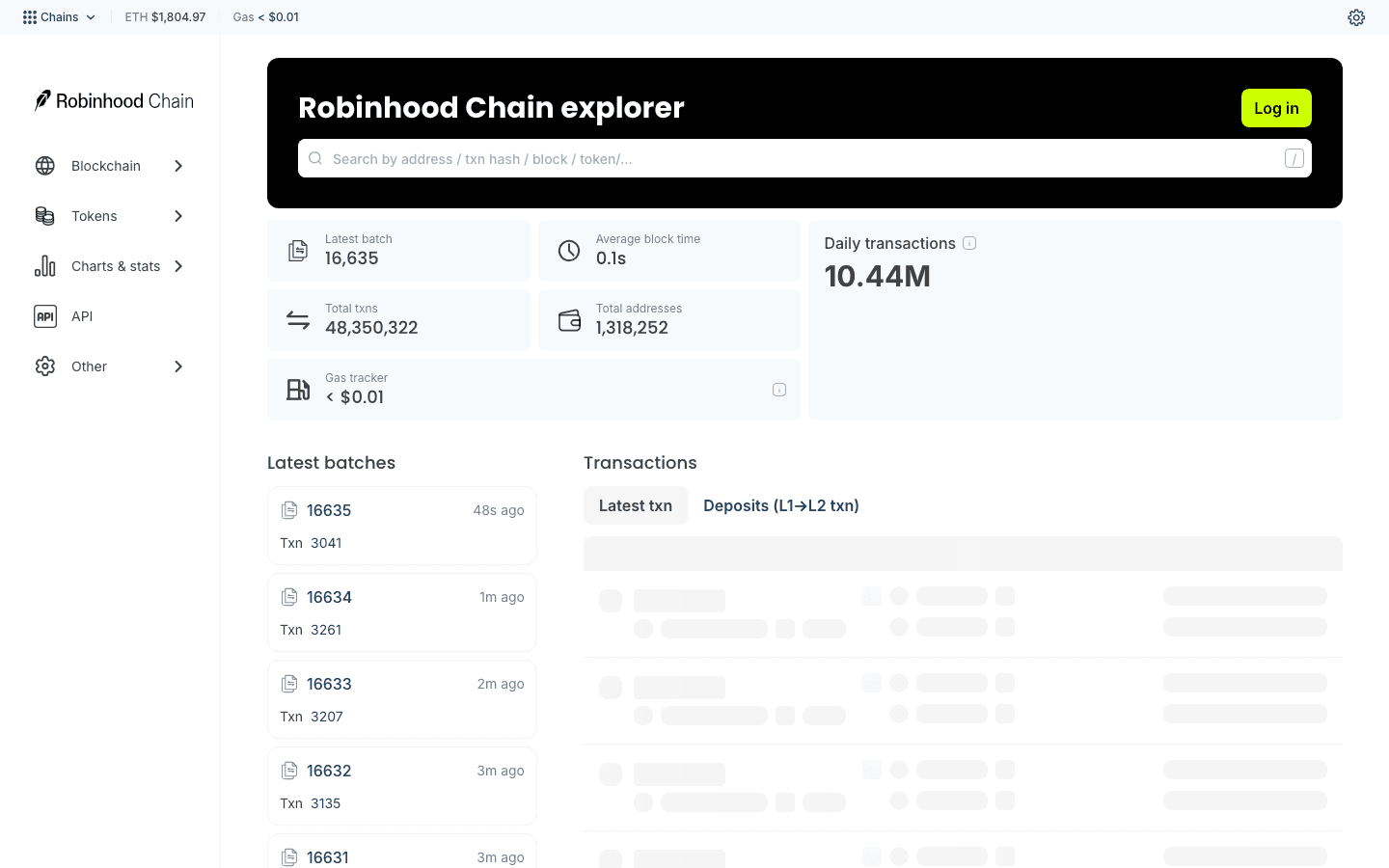
Robinhood Chain Blockscout provides the public reference point for blocks, transactions, addresses, and token contracts.
- Confirm chain ID 4663 using the official network parameters.
- Classify the address with the wallet-tracking checklist.
- If it is new, apply the fresh-wallet checks.
- For a large balance, use the whale-wallet workflow and confirm whether it is real accumulation.
- Before swapping, complete the memecoin due-diligence steps.
FAQ
Is Robinhood Chain an Ethereum network?
Robinhood Chain is an Ethereum Layer 2 built with Arbitrum technology. It uses EVM-compatible addresses and ETH as its native currency, but it has its own chain ID, balances, transactions, and application environment.
What is the Robinhood Chain mainnet chain ID?
The official Robinhood Chain mainnet chain ID is 4663. Verify this number against Robinhood’s current connection documentation before adding the network or approving a bridge destination.
What token do I need for gas on Robinhood Chain?
Robinhood’s official network configuration lists ETH as the native currency. Keep some ETH on Robinhood Chain to pay for swaps, approvals, transfers, and other contract interactions.
Can I send ETH directly to my address on Robinhood Chain?
A normal transfer does not move ETH between networks. If your ETH is on Ethereum or another chain, use an officially supported bridge route that explicitly lists Robinhood Chain as the destination.
Your wallet address may look identical across EVM networks, but the balances remain chain-specific.
Why is my bridged ETH not showing in my wallet?
The destination transaction may still be finalizing, the wallet may not be connected to Robinhood Chain, or the received asset may be represented by a token that the wallet has not displayed automatically.
Check the bridge status and search your address or transaction hash on the official Robinhood Chain Blockscout explorer.
Is the bridge shown in a YouTube tutorial still safe to use?
Do not assume so. A tutorial can demonstrate a useful workflow, but interfaces, routes, domains, and supported networks change.
Start from Robinhood’s current official docs or app and independently verify the destination chain ID before connecting your wallet.
Should I approve unlimited token spending to bridge?
Only grant the permission required for the transaction. If a bridge requires an ERC-20 approval, prefer a limited amount when possible. Review and revoke unused or risky permissions after the transaction is complete.